November 30, 2006

NH Libraries in the Blogosphere

There are a growing number of libraries here in NH who are creating blogs to communicate with their communities. I plan to use the space at the lower right of our NHAIS blog to spotlight different library blogs that I come across. Today I added a live feed from the Madison Library's blog. If your library (or your librarian) has a blog that you would like me to share with the NHAIS community send me an email (mrussell@library.state.nh.us) with the link to your RSS feed.

November 28, 2006

Evernote: Your Personal Note-keeper

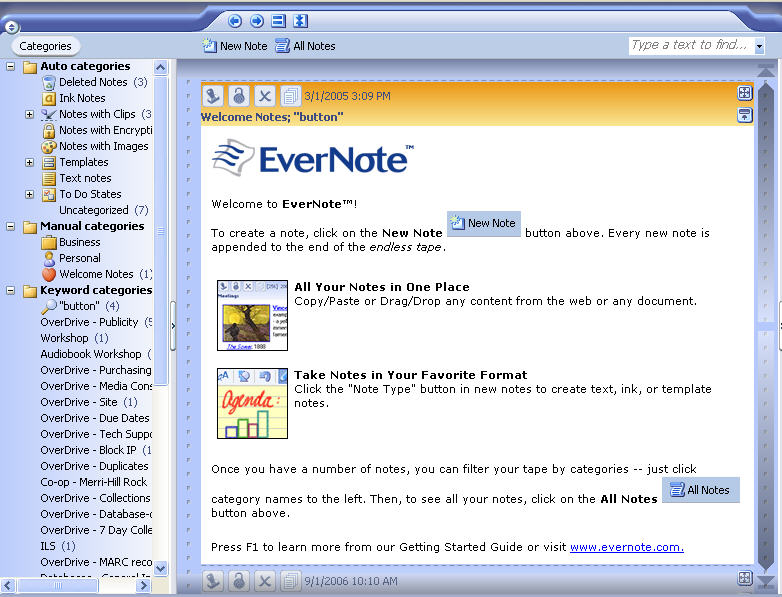
I love EverNote! Unlike most of the computer application I rave about, EverNote is not Web-based. (Gasp!) It must be downloaded to your computer. However, ignoring that issue, I think EverNote is one of the best free products available to help you keep track of all of the pieces of information in your life.


EverNote works as a "scrolling, never-ending note." You simply write a new note to yourself and it is saved automatically. However, it is more sophisticated than the spiral notepad that sits on your desk. Here are a few of the features that make EverNote so great:
  • Full text search capability: Search through all of your notes at once for a particular word.

  • Tagging: You can assign multiple keywords to each note. The keywords show up as categories that you can see at a glance.

  • Copy and paste: Copy and paste from your email, documents, the Web, or anywhere! You can save screen shots, graphics, etc. to your personal database.

You can find EverNote at: http://www.evernote.com/

November 21, 2006

Audio Book Fee Reduced for Small Libraries

The annual membership fee for joining the NH Downloadable Audio Book Consortium has been reduced from $500 to $200 for libraries with a population of less than 2500. The next round of libraries will be added in December and January so don't miss this chance to join this very popular program.
The one time $600 configuration fee remains the same but libraries are eligible to receive grant money to offset this cost by applying for the Gates Staying Connected Grant. For information on the Grant go to http://www.nh.gov/nhsl/services/librarians/gates/staying_connected.html.
Any questions or for more information on the program contact:
Diana Degen ddegen@library.state.nh.us OR
Bobbi Slossar bslossar@library.state.nh.us at 603-271-2143

November 17, 2006

Runnemede School holdings removed from NHU-PAC

All holdings (1311 of them) for Runnemede School in Plainfield were removed from the NHU-PAC today. The school (last operating as River Valley Country Day School) closed in June 2006. Thank you to Nancy Norwalk, director at Plainfield's Philip Read Memorial Library, for bringing this to the attention of NHAIS Services.

NHU-PAC searching restored

NHU-PAC searching and other functions are back to normal after an outage which started around 10:15 a.m. Friday, November 17, 2006. If you find some functions not working as they should, please let the NHAIS Help Desk know at 271-2141.

November 16, 2006

Online Data Storage

I bet you've heard this before: "Can I borrow a floppy disk; I promise I'll return it tomorrow." Or more recently... "Where is the USB port? I have to save my paper on my flash drive."

Instead of floppies or flash drives, why not direct your patrons to online storage accounts? There are many, many companies that offer online storage - for free!

If your patron already has a Yahoo account, direct him or her to briefcase.yahoo.com, where it is possible to save 30 MB of data in a free account.

Box.net is another online storage company to try. Registered users can save 1 GB for free.

Individuals with Google accounts can save Word and Excel documents in Google Docs & Spreadsheets.

By the way, online storage is a great way of backing up your important files, too!

November 15, 2006

Setting up an email subscription to this blog

To get information from our blog to the people in NHAIS libraries we have set up an RSS (Real Simple Syndication) feed. (FYI: we used Feedburner to do this) Having an RSS feed basically means that our blog postings can be ‘broadcast’ to anyone who wants to receive them. We have built into this site several ways people can get this feed.

The first of these built in subscription options is using an RSS to email reader from Squeet (I know, it’s a weird name, but so is Google and we say that all the time) you can have each posting made to the NHAIS blog sent to you as an email message.

There were a couple of reasons I like Squeet over other options for this:
1- the message that is sent out has the name of the blog it came from in the subject line followed by the title of the individual post, which helps you identify incoming emails as NHAIS info
2- the frequency of the delivery can be controlled by the subscriber when they set it up – you can get messages live, or daily, or weekly, whatever suits you
3- the tests I did showed that the messages actually arrive in your inbox soon after they are posted, other options seem to have a longer delay before I got the emailed postings
4- the subscription information is confidential, Squeet says that they don’t share the addresses of people who use their service, which I thought would appeal to the privacy-sensitive librarian in all of us.
5- As the blog administrator I can get a count of the number of subscriptions (not who they are, just a total number) and when they were set up so I have some idea if we are actually reaching anyone with this information
6- The sign up was fairly simple to deal with for the subscriber.

To set up an email subscription to get NHAIS Notes postings as they are created:

Type the email address where you want to get the feed into the purple box where it says “enter your email here to subscribe” then click the subscribe button.

A form with “subscribe to NHAIS Notes” at the top will display. If you have used Squeet before and you have a password for it, enter your password and proceed. If you are new to Squeet you will need to use the radio button above where your email address displays to switch to the ‘signup’ page instead of the login page.

At the login page enter your name; change the timezone to ‘Eastern time (US & Canada)’ or whatever timezone you want to get your email in; create a password for your account and then type it in again to make sure you typed what you think you did.
The default on the form is that you will want to subscribe to the Squeet blog in addition to the NHAIS Notes blog. If you don’t want the Squeet blog sent to your email address uncheck the box below your password. When everything is entered, click the “SIGN UP” button.

Squeet will display a page full of topics that they hope will interest you and you can check off any of them to be subscribed to feeds on these topics – again this is in addition to the NHAIS Notes blog that you came here to sign up for. If you don’t want any of these click on the NO THANKS button at the bottom of the window.

The next screen you see will tell you that your account status is unverified. Close the browser window. You will receive an email message fairly soon (but not immediately in my experience) from DoNotReply@squeet.com which includes a “Verify your email address” link in it as well as information about ways to make sure you get the messages you signed up for. Click on the verification link to reopen the Squeet.com page which will say “Account status: Confirmed” at the top and have your NHAIS Notes subscription listed at the bottom of it. If the frequency listed on the NHAIS Notes feed subscription line says “live” then you will get a message each time a post is added to the blog. If you want to change this so it comes less often click on the edit icon at the left end of the subscription line (it looks like a paper with a green pencil on it). Drop down boxes will appear on the line for the elements you can change, adjust them to suit you and then click on the ‘update” icon (it looks like a blue floppy disk).

At this point you have a Squeet account and are subscribed to the NHAIS Notes blog. You can use this same Squeet account to get any other blogs you are interested in emailed to you by entering the feed address (which is usually slightly different from the blog address) into the box at the top of the Squeet subscription page.
November 14, 2006

Internet Explorer 7.0 does not work with ILL

Microsoft has begun distributing the next version of its browser but be aware that Internet Explorer 7.0 cannot display NHU-PAC's ILL program properly (nor can it properly display any Web sites that use the same frame structure). Because this new version is sometimes installed through Microsoft's Automatic Updates program, you may end up with IE 7.0 even without actively seeking it out. If that happens, you have a few options to continue using NHU-PAC ILL. One is to roll back to IE 6.0 (your security software may offer this option). Another is to install and use a different browser--Firefox, Netscape, Opera, and other browsers are available as free downloads and should work fine with NHU-PAC ILL (please let NHAIS Services know if you find otherwise). You can have more than one browser installed and running on your computer.

Right Attitude to Rain cataloging mixup

Prior to September 25, 2006, the NHU-PAC records for the first and large print editions of The Right Attitude to Rain were mixed up because of an error in records supplied by OCLC. If you added a holding for Alexander McCall Smith's latest book before that date, please check that it ended up on the record for the correct edition.

Getting lists of titles into Holdings Maintenance

Having trouble getting lists to transfer into Holdings Maintenance? In order for the program to recognize your list, the address displayed by your browser needs to have a long URL that includes a session number before you click on the Holdings Maintenance tab. If the URL ends with .../ipac20/ipac.jsp, just click on Title (underlined, on the blue-ish bar) and you should see more data, including a session number, added to the URL. This applies to My List and saved lists that you've named.

Which edition?

When checking incoming ILL requests, remember to pay attention to the edition being requested. This reminder comes after a discussion on NHAIS-ILL (begun October 23, 2006) about requesting large print materials in the NHU-PAC's ILL program. One response to the suggestion to include the subject term "large" in combination with another search term on the ILL Advanced Searching page was "this works great, as long as the librarian checking requests bothers to cross-check the ISBN and send you the LP copy!" Even without the ISBN, you could get a clue from the edition statement, imprint, or your local call number (all of which display if available) as to whether the regular or large print edition is sought. The same applies to cassettes vs. discs, etc.

Searching ISBN-13s in ILL

13-digit ISBNs on newer NHU-PAC records will be searchable in the ILL program but may not display on all pages. For instance, you may see either a blank space or a 10-digit ISBN next to the ISBN label on the Availability screen. This problem has been reported to SirsiDynix.

NH Downloadable Audio Book subtab in NHU-PAC

A subtab for the NH Downloadable Audio Book Consortium has been added to the NHU-PAC's About NHAIS tab. Included are links to information about the program, a list of participating libraries, and MARC records for the audio files that are part of the program.

My List workaround

Some NHU-PAC users continue to have problems with titles disappearing from My List. As there is no imminent fix for this problem, we pass along a workaround that one user swears by. The user reports no more disappearing titles as long as, during each NHU-PAC session, the first two titles are added to My List from the MARC Display. NHAIS Services makes absolutely no promises that this trick will work for you but you're welcome to try it if you continue to run into this problem.

NHU-PAC next generation planning

This month marks 4 years since the implementation of the current system hosting the NHU-PAC. Although the contract for the SirsiDynix system runs into 2009, a committee has already been formed to begin planning for the next generation of the NHU-PAC. A survey of NHAIS user needs is expected to be conducted in spring 2007.

Statistics

The NHAIS databases have the following statistics

NHU-PAC (NHAIS database)

Titles Items Date & time
1697264 5072008 Nov 2 2006 8:13AM
1697999 5078991 Nov 8 2006 8:20AM

Moose (State Library database)

101743 136431 Nov 13 2006 7:57AM
101767 136604 Nov 14 2006 1:28PM

Gilford Public Library

41822 46004 Nov 13 2006 7:44AM
41831 46013 Nov 14 2006 1:28PM

Why a blog?

This blog was created to replace NHU-PAC News which published its last issue recently. Why a blog? It will allow us to get news out in a more timely fashion than accumulating items for the next issue of NHU-PAC News. It will provide a searchable archive of past items. It will let you see all postings on a single topic like interlibrary loan, cataloging, or searching (use the links at the right marked "posts by topic"). It will also provide a place -- outside of the state computer system -- where you can check for system news. When a listserv, or a NHU-PAC function, or the whole NHU-PAC is out of whack we plan to post that information here so you will know what is going on.
A Blog also gives you a choice of how you get the news: you can read it on the Web or have postings e-mailed to you as individual messages or daily digests or have postings fed to you via RSS or Atom feeds. The State Library's Electronic Information Resources section is joining NHAIS Services in contributing to NHAIS Notes so you'll find news about NHewLink in addition to items about the NHU-PAC.
We plan to spotlight library related blogs as we come across them. The first one -- you'll find a feed from it in the lower right of this page -- is the Audiobooks blog Bobbi Slossar created for the NHSL Overdrive project. If your library has a blog, or if you read one you think others might be interested in, let me know by emailing me. (mrussell @ library.state.nh.us)

November 9, 2006

Find Biographies Online

New to NHewLink: Biography Resource Center. Questions about this online database from Thompson/Gale should be directed to Diana Degen (ddegen @ library.state.nh.us) or 271-2143.

Getting lists into Holdings Maintenance

Having trouble getting lists to transfer into Holdings Maintenance? In order for the program to recognize your list, the address displayed by your browser needs to have a long URL that includes a session number before you click on the Holdings Maintenance tab. If the URL ends with .../ipac20/ipac.jsp, just click on Title (underlined, on the blue-ish bar) and you should see more data, including a session number, added to the URL. This applies to My List and saved lists that you've named.

Neatness counts!

If you're writing Request ID#'s on your ILL routing slips, please make sure your numbers are legible. We've heard from libraries upset with sloppy writing that requires them to take extra time to find the right number to Receive or Complete the transaction.

Quality Control

If you find an error in a NHU-PAC record, please let us know about it. You may contact the NHAIS Help Desk at 271-2141 or or send information via the van to Concord/NHSL/NHAIS Services. It would be helpful to us if you could note the NHU-PAC record number--you'll see it as "Bib #" near the upper right of your screen when you click on MARC Display. For some corrections, we may ask you to send photocopies of relevant parts of the item you have.

November 7, 2006

Downloadable Audio Book Records

Even more bibliographic records for online resources are making their way into the NHU-PAC with the addition of titles for the NH Downloadable Audio Book Consortium (http://nh.lib.overdrive.com/28ADC415-6BCB-4D8F-AB29-E48654AEEDBA/10/244/en/Libraries.htm). In many cases, you will not find Add Holding or Delete Holding buttons when you bring these records into Holdings Maintenance. You can still download the records for use in your local automation system. A subtab under the Librarian's Tools tab will be added shortly to make locating the Overdrive records easier.

Awarding information

The Librarian's Tools tab has received some enhancements. By request of NHU-PAC users, the award links have been modified. The Flume and Isinglass awards have been added to the list while Caldecott, Newbery, and Pulitzer winners are now more thoroughly documented in our database. Let your mouse pointer linger on the award names and the "hover text" will tell you that, e.g., the Flume link includes current nominees while the Pulitzer fiction link includes all winners since 1948. Another change under Librarian's Tools is that the Children's Book Review now has its own subtab.

ISBN-13's in the NHU-PAC

Beginning Monday, November 13, 2006 new bibliographic records added to the NHU-PAC will have 13-digit ISBNs that are searchable in the same way as 10-digit ISBNs. In most cases, newer records will be searchable in both 10- and 13-digit formats. The project to upgrade all existing NHU-PAC records to the new ISBN format remains in the future but hundreds of records will be upgraded each week in the course of our regular program to correct and improve the database. Many records added in the past year have 13-digit ISBNs in them but you must use the Numbers Appearing On Materials browse search to find them.